Interactive Brokers – TWS & Gateway
On this page
Warning: We don’t recommend using the Interactive Brokers paper trading mode. The Tickblaze platform offers a more robust implementation of simulated trading accounts. Our version is more stable and flexible, since it allows for unlimited user-created simulation accounts and allows the user instant addition, deletion, modification and resetting of simulated trading accounts.
Interactive Brokers Connection Prerequisites
Before you can connect Tickblaze to Interactive Brokers, the Interactive Brokers TWS platform or their IB Gateway must be installed and configured properly. Below are detailed instructions for the installation and configuration of TWS and IB Gateway.
TWS Platform Installation and Configuration
To download and install the TWS platform:
- Download the TWS installer from Download TWS Stable | Interactive Brokers LLC
- The TWS installer download page has links to the TWS installation instructions and an installation video.
- After you have downloaded the TWS software installation file as instructed above, go to the Downloads folder in your computer and locate the “tws-stable-windows-x64” (or similar) file.
- Double-click on the “tws-stable-windows-x64” file name and follow the instructions reachable from the download page in step 1.
To configure the TWS platform application:
- Double-click on the TWS icon placed on your computer desktop when you installed TWS to launch the application.
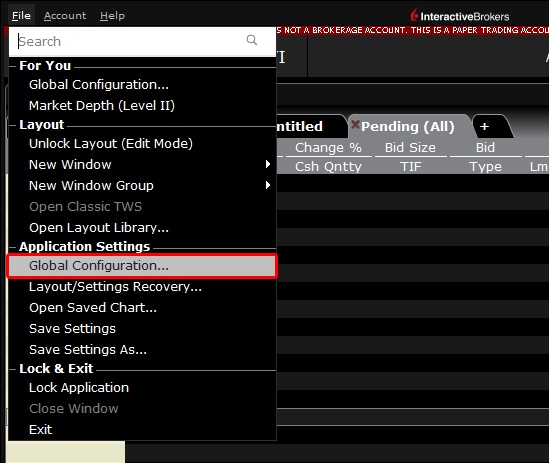
- Open the TWS Global Configuration Window as shown below:
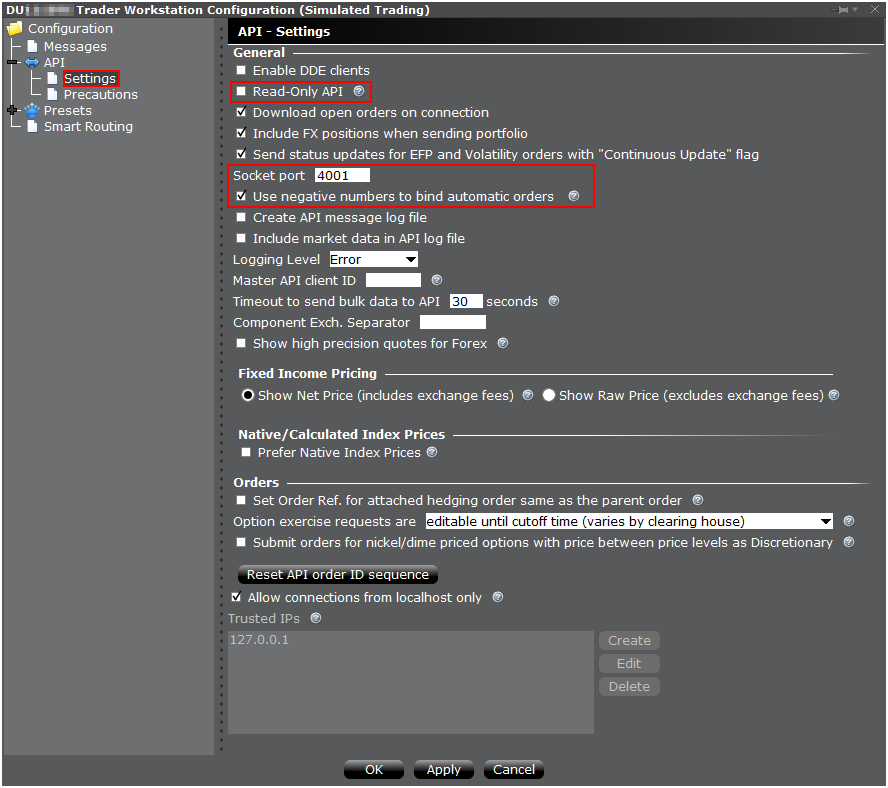
- Once the TWS Global Configuration window has displayed, configure TWS API Settings as shown in the screenshot below:
Note: The TWS API settings shown below are applicable to the live IB brokerage account only. The Tickblaze platform offers a more robust implementation of simulated trading accounts. Our version is more stable and flexible, since it allows for unlimited user-created simulation accounts and allows the user instant addition, deletion, modification and resetting of simulated trading accounts.
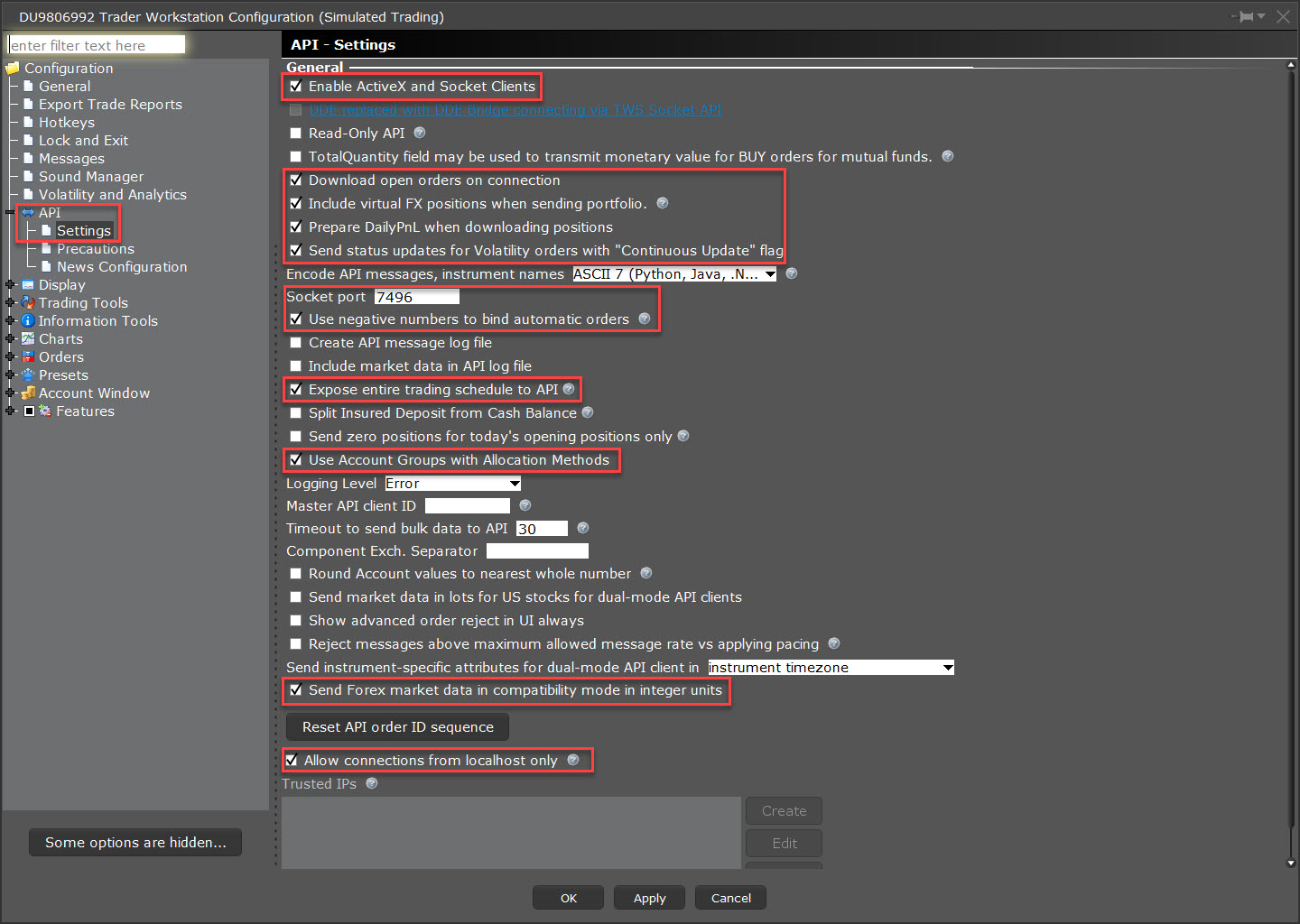
- Click on “Ok” to save your settings and close.
- Your TWS platform is now configured and ready for use.
IB Gateway Installation and Configuration
As an alternative to TWS, you can choose to run IB Gateway, which has the benefits of consuming fewer resources than TWS and not forcing a disconnect every day, like TWS does. If you choose to use IB Gateway, then you need to install it and configure it as follows:
To download and install the IB Gateway:
- Download the IB Gateway installer from IB Gateway | Interactive Brokers LLC
- The IB Gateway installer download page has installation instructions.
- After you have downloaded the TWS software installation file as instructed above, go to the Downloads folder in your computer and locate the “ibgateway-stable-standalone-windows-x64” (or similar) file.
- Double-click on the “ibgateway-stable-standalone-windows-x64” file name and follow the instructions reachable from the download page in step 1.
To configure the IB Gateway:
- Prior to Login, select the IB API
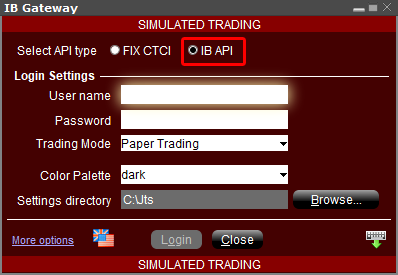
- Configure IB Gateway API Settings
Note: The IB Gateway API settings shown below are applicable to the live IB brokerage account only. The Tickblaze platform offers a more robust implementation of simulated trading accounts. Our version is more stable and flexible, since it allows for unlimited user-created simulation accounts and allows the user instant addition, deletion, modification and resetting of simulated trading accounts.